Compatible with CDJ-3000 & DJM-A9

Play it live.
Fix it after.

WaveShift records every load, cue, fader, EQ and effect you do on the decks, not the audio. Then it rebuilds your set from your own mastered tracks, so you can fix a transition and export a clean WAV.

Windows 10/11 · 14 days, everything unlocked · $79 one time, no subscription

0audio recorded, so no baked-in mistakes
100%offline. Your sets and music never leave your PC
16/24bit WAV export, same EQ, filter and FX maths
$0per month. Buy it once, keep it

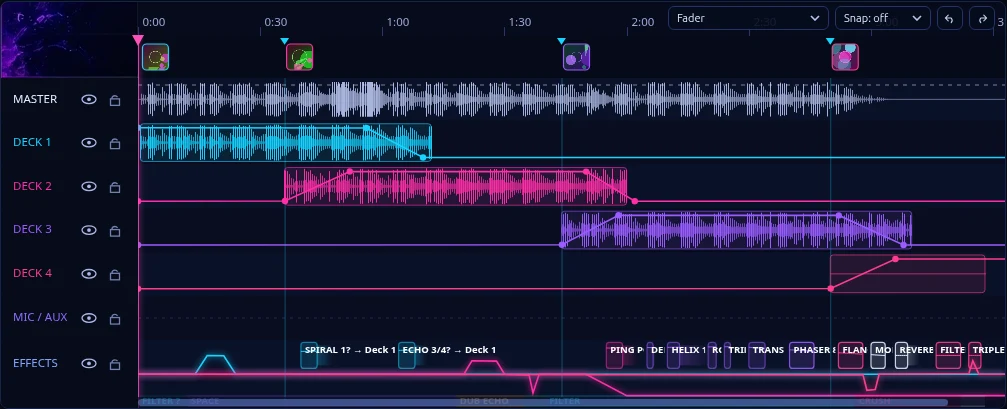
Your whole set, as a timeline you can edit

Every track you played, every transition as you played it, every fader move, EQ sweep and effect. Drag, trim, re-blend. Nothing is flattened into audio.

CAPTURERECONSTRUCTMIXEXPORT
SET PROJECT  WaveShift demo set
The WaveShift editor timeline: four deck rows with clips, crossfades, automation lines and an effects row.

A real screenshot of the editor timeline, from the built-in demo set.

Three steps

Record. Rebuild. Export.

01

Play your set

Plug your laptop into the same switch as your CDJs and mixer and press Record. WaveShift joins Pro DJ Link and listens over USB MIDI, logging loads, tempo, playhead, faders, EQ, filters and effects. Or skip the laptop and let the WaveShift Recorder do it.

02

Rebuild it

Plug the CDJ USB stick into your laptop and WaveShift finds the tracks you played, or point it at your music folder or a rekordbox XML. Your set is rebuilt from your own mastering-grade files.

03

Fix it and export

Trim, move, split, re-blend. Redraw an EQ curve, swap an effect, ramp the tempo. Check the loudness, then export a 16 or 24-bit WAV ready for SoundCloud or a mix series.

Built for mixes

Everything you touched, still editable

Mixer data, not a recording

Trim, HI / MID / LOW, colour filter, channel faders, crossfader and the DJM-A9's Beat FX and Sound Color FX are all captured as automation. Move a point and the export changes with it.

Your tracks, untouched

The audio comes from your original files, so nothing was ever squashed by the booth's hardware.

Fix any transition

Drag clips, trim edges, right-click to split. Cue, transition in/out, blend length, crossfade, bass swap and filter-out tools.

All 14 Beat FX

Delay, Echo, Ping Pong, Spiral, Helix, Reverb, Flanger, Phaser, Filter, Trans, Roll, Mobius and more. Add, switch or delete them after the fact.

Tempo ramps & sync

Glide a track from one BPM to another, draw a tempo lane, or sync a deck to the loudest other deck.

Master it before you post it

Optional master reverb, delay and compressor, a limiter, and LUFS measured on your export so the whole set sits at a consistent level.

Crash-proof capture

The set is snapshotted every few seconds. A power cut turns into a recovered set, not a lost night.

No decks? No problem

Open it as a plain studio editor and build a set by dragging tracks in.
WaveShift Recorder

A little box that never forgets a set

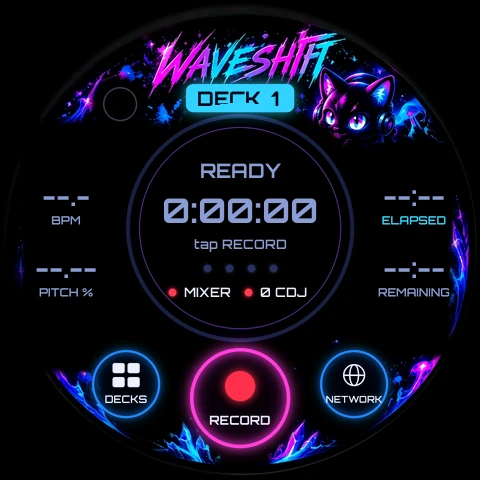
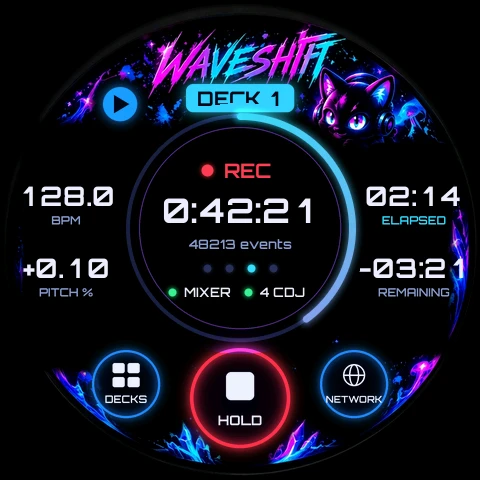
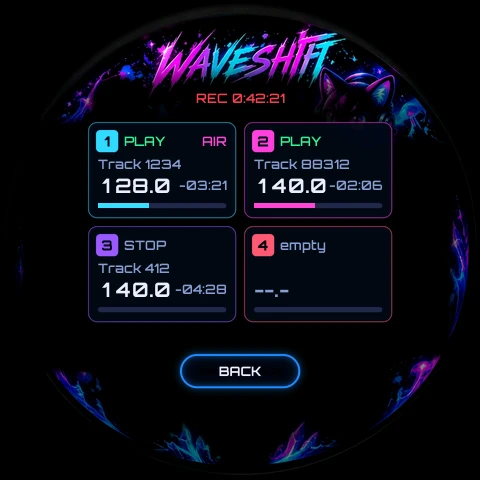
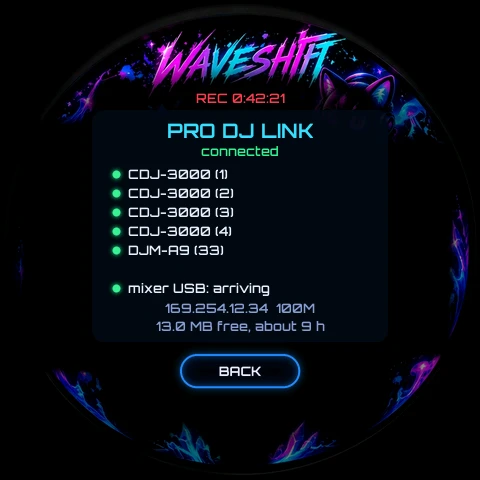
Plug it into the DJ network switch and the mixer's USB port. Tap RECORD on its round touch screen. No laptop in the booth, nothing to crash. Tested with CDJ-3000s and a DJM-A9.

  • Mixer over USB, decks over Pro DJ Link on its own Ethernet port
  • Copy finished sets to your computer with one click, then edit them in WaveShift
  • Full WaveShift licence works with it, no extra subscription

The screen as the firmware draws it: ready, recording, decks and network pages.

See pricing

Honest compatibility

Tested on real gear. We say exactly which.

Tested

  • CDJ-3000 (two decks): load, play, tempo, pitch, playhead, track IDs
  • DJM-A9: trim, EQ, colour filter, channel faders, crossfader, on-air flags
  • WaveShift Recorder: mixer over USB, decks over Pro DJ Link, touch RECORD
  • Windows 10 / 11

Experimental

  • CDJ-2000NXS2, CDJ-2000, XDJ models
  • DJM-900NXS2, DJM-V10 and other mixers
  • Run our capture kit and send us the result, we'll add your gear

Good to know

  • Beat FX and EQ are close approximations of Pioneer's, not their exact DSP
  • You need your own copies of the tracks you played
  • On the DJM-A9, light the MIDI button or it sends no faders or EQ
  • macOS is not supported yet

Pricing

One price. No watermark. No subscription.

Try everything free for 14 days, then keep it for good.

Trial

Free14 days
  • Every feature unlocked
  • Record and export during the trial
  • After it ends you can still open and edit your sets
Download trial
Own it forever

WaveShift

$79one time
  • Permanent licence, no watermark on your exports
  • Recording and export, forever
  • Works offline, one key for all your computers
Buy WaveShift

Price shown in USD.

Recorder box

$249+ shipping
  • Round touch-screen recorder, ready to plug in
  • Records decks and mixer without a laptop
  • Includes the full WaveShift licence
Get the Recorder

Straight answers

Does it record audio?

No. It records control data: which track was loaded, when it played, the tempo, the faders, EQ and filter moves, and the mixer's effects. The audio is rebuilt from your own files, which is why your tracks stay mastering-grade.

Will the export sound exactly like the club?

It is a faithful rebuild, not a copy. The EQ, filter and effects are close approximations of Pioneer's, and the preview and the export use the same maths so what you hear is what you get.

How does it find my tracks?

Record with your CDJ USB stick in the decks, then plug it into your laptop and WaveShift reads the track list from it. Or give it your music folder or a rekordbox XML export.

What happens when the trial ends?

Recording and export stop until you enter a key. Opening and editing your sets keeps working, so you never lose access to them.

Does it phone home?

No. The editor is bundled and only talks to itself on your own machine. The one exception is a once-a-day check for a new version, which you can switch off in settings.

Is it affiliated with Pioneer DJ / AlphaTheta?

No. WaveShift is independent software that is compatible with their gear.

Never settle for the take you got.

Record your next set. Fix the one transition you can't stop thinking about.

Download free trial